Flow map
Every screen and where its actions lead. Screens within a chapter are not in sequence; follow the links.
- Link1.4 From the spec
- Link1.4 Implied, not in the spec (no dead ends)
- Screen
- Branch screen (failure or edge case)
1First open & browse
2Account gate
3Before recording
4Record the signboard
5Show the site, then send
- 5.1Show the site: 4 story points + 1 optional
- 5.2aPoint camera, photo
- 5.2bPoint camera, video
- 5.2cLive cue: too dark
- Shutter5.3b
- 5.2dPhone held sideways
- Hold upright5.2a
- 5.3aQuality check: passed
- 5.3bQuality check: failed
- 5.4One point's shots
- 5.5Checklist, minimum met
- Continue5.6
- 5.6Review all, grouped by point
- Send5.7
- 5.7Sending 9 separate files
- 5.8aOne file not sent
- 5.8bSubmitted
- 5.9Map, signed in
6Reports: follow-up
- 6.1aReports, week 1
- 6.1bBranch from 5.8a:
- 6.2aReports, week 3
- 6.2bWeek 3, scrolled
- 6.3Detail: verified, on hold
- 6.4Detail: rejected, too far
- Record again3.5
- 6.5Detail: shots too blurry or dark
- Record again3.5
- 6.6Detail: could not be verified
- Back6.2b
- 6.7Detail: verified, not paid
- Find open sites1.1
- 6.8Detail: paid
- Open public report8.3
7Wallet: get paid
- 7.1Wallet, week 1, no address yet
- 7.2Add address
- 7.3Scan address QR
- Code read7.2
- 7.4aInvalid address
- Fix the address7.2
- 7.4bAddress already used
- Use another address7.2
- 7.4cAddress blocked
- Use another address7.2
- 7.5Confirm before saving
- 7.6Address saved
- 7.7Change address
- Confirm7.8
- 7.8Passkey check
- OK7.6
- 7.9Payouts, week 3
- Back7.6
- 7.10Get your address from GCash
First open & browse
No account needed. Find a site, see what it pays, learn how to earn.
Near you
3 open bountiesAdd the app to your home screen
Opens faster, like a normal app. No Play Store needed.
Near you
3 open bountiesLanguage · Wika
Applies to every screen.
Project
Flood control structure, Brgy. San Roque
- Budget
- ₱48.2M
- Due date
- 15 Mar 2026 (passed)
- Status
- Ongoing
Bounty open
20 USDC
Goes to the first verified set of this site.
How to earn: stand within 150 m. Record the signboard (15 s), then shoot each part of the site.
Source: DPWH Transparency PortalProject
Flood control structure, Brgy. San Roque
- Budget
- ₱48.2M
- Due date
- 15 Mar 2026 (passed)
- Status
- Ongoing
Bounty not open
Reopens 3 Jan 2027A video now is not paid. It still gets a public report.
Account gate
Appears only at the first tap on Record or Wallet. No name, phone or email. Returns the user to where they were going.
Make an account to record
So we can pay you in USDC.
No name, phone or email.
Only a passkey on this phone.
Make an account to record
So we can pay you in USDC.
No name, phone or email.
Only a passkey on this phone.
Create a passkey for bantaygawa.ph
You are
@tala-482
Your passkey is saved in your phone's password manager. Use it to sign in again.
If you lose the passkey, you lose the account. Keep your screen lock on.
Make an account to record
So we can pay you in USDC.
No name, phone or email.
Only a passkey on this phone.
Sign in to bantaygawa.ph
Passkey not created
You closed the phone prompt. Nothing was saved.
Hindi nagawa ang passkey
Walang screen lock ang phone mo. I-on ito sa Settings, saka subukan ulit.
Before recording
Permissions once, then a live location check. Every block says how to get unstuck.
Before you record
Record needs 3 permissions
Asked once, the first time you tap Record.
Camera
To film the site live.
Location
To check you are within 150 m.
Motion
To check you turned 90°.
Your phone asks 3 times. Tap Allow each time.
Before you record
Record needs 3 permissions
Asked once, the first time you tap Record.
Camera
To film the site live.
Location
To check you are within 150 m.
Motion
To check you turned 90°.
Your phone asks 3 times. Tap Allow each time.
bantaygawa.ph wants to use your camera
Then location, then motion.
Camera is blocked
Record can't work without it. Turn it on:
- Tap the lock icon next to the web address.
- Tap Permissions › Camera.
- Choose Allow, then come back.
Record works only on a phone
This browser can't record. Open the app on your phone, then tap Record.
Location check
Flood control, Brgy. San Roque
Site area: 150 m around the pin
You are 80 m away
In range. Location accurate to 12 m.
3 of 5 submissions left today.
Location check
Flood control, Brgy. San Roque
Site area: 150 m around the pin
You are 340 m away
Move within 150 m. This updates as you walk.
Location check
Flood control, Brgy. San Roque
Site area: 150 m around the pin
GPS not exact enough
Now 64 m. Needs 30 m or better. Go outside, away from tall buildings, and wait.
5 / 5
Daily limit reached
You sent 5 submissions today. That is the limit. Record again tomorrow.
Resets at 12:00 AM, Manila time.
No signal
Record needs internet to check your location and send. Move to a spot with signal.
Record the signboard
Step 1 of 2. Live camera only, 15 s: signboard first, then turn 90°. No gallery or file option exists.
Before you start
Clear shots get verified
Blurry or dark ones get rejected.
Daylight
Face away from the sun.
Hold still
Wait for the shot to look sharp.
Fill the frame
Get close to what you show.
Upright, move slowly
Portrait shots, smooth pans.
Point at the signboardThen turn slowly right
Tap to record 15 s
Start on the signboardHold 2 s, then turn slowly right
Recording · stops by itself at 15 s
Keep turning rightSlow and steady
48° of 90°
Recording · stops by itself at 15 s
38°
You did not turn enough
Turn at least 60°, best 90°. Then record again.
Same submission. Only the signboard video is recorded again.
Show the site, then send
Step 2 of 2. Four story points, several shots each, in-app camera only, portrait. Every shot gets a quality check. Each file stays separate.
Show the site
Add 1 shot to each required point to continue.
What would make someone stop and look?Unfinished, broken, or well done
Shot 1 of up to 5
Shot 2 of up to 5 · recording
Cracks, steel, finish, materials.Fill the frame with it
Shot 3 of up to 5
Turn upright to shoot
Most striking view
Looks clear
Sharp and bright enough to verify.
Close-up details
Too blurry. Retake it.
Hold still until it looks sharp. Blurry shots get rejected.
Close-up details
Clear
Clear
Blurry
Show the site
More clear shots make verification more likely.
Sending
Signboard video
1 file · 18 MB
SentMost striking view
2 files
SentWhole structure
2 files · 1 of 2 sent
SendingClose-up details
3 files
WaitingWho uses it
1 file
WaitingKeep the app open. About 60 MB · Wi-Fi recommended.
1 file not sent
Signal was lost. The other 8 are sent. This one is still on your phone.
Signboard video
1 file
SentMost striking view
2 files
SentWhole structure
2 files
SentClose-up details
3 files · 1 not sent
Not sentWho uses it
1 file
SentSend by 3:41 PM. After 6 h it can't be sent. It also waits in Reports.
Submitted
We check your 9 shots now. Follow it in Reports.
- Sent: 9 separate files10:02 AM
- Checkinga few minutes
- Review by a person, if neededup to 24 h
- Result + payoutin Reports
Reports: follow-up
Every row says its status, whether it pays, when, and the next step. Week 1 = no payout address yet. Week 3 = address ready, payouts flowing.
Reports
Reports
Reports
Reports
Report
School building, Brgy. Parang
Sent 19 Oct 2026, 10:02 AM
Verified
20 USDC
Pays in 17 h 40 m, after a 24 h safety hold.
- Sent10:02 AM
- Checked10:05 AM
- Verified10:06 AM
- Payout
After the 24 h safety hold.
Tomorrow 10:06 AM
Report
Barangay hall, Sto. Niño
Sent 6 Oct 2026, 9:15 AM
Rejected: too far
You were 410 m from the site. Go within 150 m and record again.
- Sent9:15 AM
- Checked: too far9:18 AM
Report
Covered court, Malanday
Sent 6 Oct 2026, 5:40 PM
Rejected: shots too blurry or dark
We could not see the site clearly. Record it again in daylight and hold still.
- Sent: 9 shots6 Oct
- In review6 Oct
- Reviewed: too blurry or dark7 Oct
Report
Covered court, Parang
Sent 15 Oct 2026, 2:20 PM
Video could not be verified.
Report
Pumping station, Tañong
Sent 14 Oct 2026, 8:50 AM
Verified · Not paid
20 USDC
Another user's video of this site was verified first. Your report is still public.
- Sent8:50 AM
- Verified8:56 AM
Report
Drainage canal, Brgy. Tumana
Sent 6 Oct 2026, 8:30 AM
Paid
20 USDC
Sent to 0x12ab…9f0c on Base, 8 Oct.
- Verified6 Oct
- Waited for payout address6–8 Oct
- Sent, confirmed on Base8 Oct
Wallet: get paid
One payout address, USDC on Base only. 48 h wait after add or change. Change needs a passkey check.
Wallet
20 USDC
0 paid · 20 waits for your payout address
Payouts
Payout address
- One account per address.
- Payouts start 48 h after you save.
Scan your USDC on Base address
In GCrypto: USDC › Receive › Base
Payout address
This is not a full address. Copy it again from your wallet.
- One account per address.
- Payouts start 48 h after you save.
Fix the address to save.
Payout address
This address belongs to another account. Use your own address.
- One account per address.
- Payouts start 48 h after you save.
Add your own address to save.
Payout address
- One account per address.
- Payouts start 48 h after you save.
Add a different address to save.
Payout address
- One account per address.
- Payouts start 48 h after you save.
Check before you save
- Address
- 0x12ab…9f0c
- Coin
- USDC
- Network
- Base
Wallet
20 USDC
0 paid · 20 sends when your address is ready
Payouts
Change address
Change address
Confirm it's you
bantaygawa.ph
Payouts
6 payouts
40 USDC paidGet your USDC address
You need a USDC on Base address. Here’s how to find yours in GCash.
Open GCash and log in

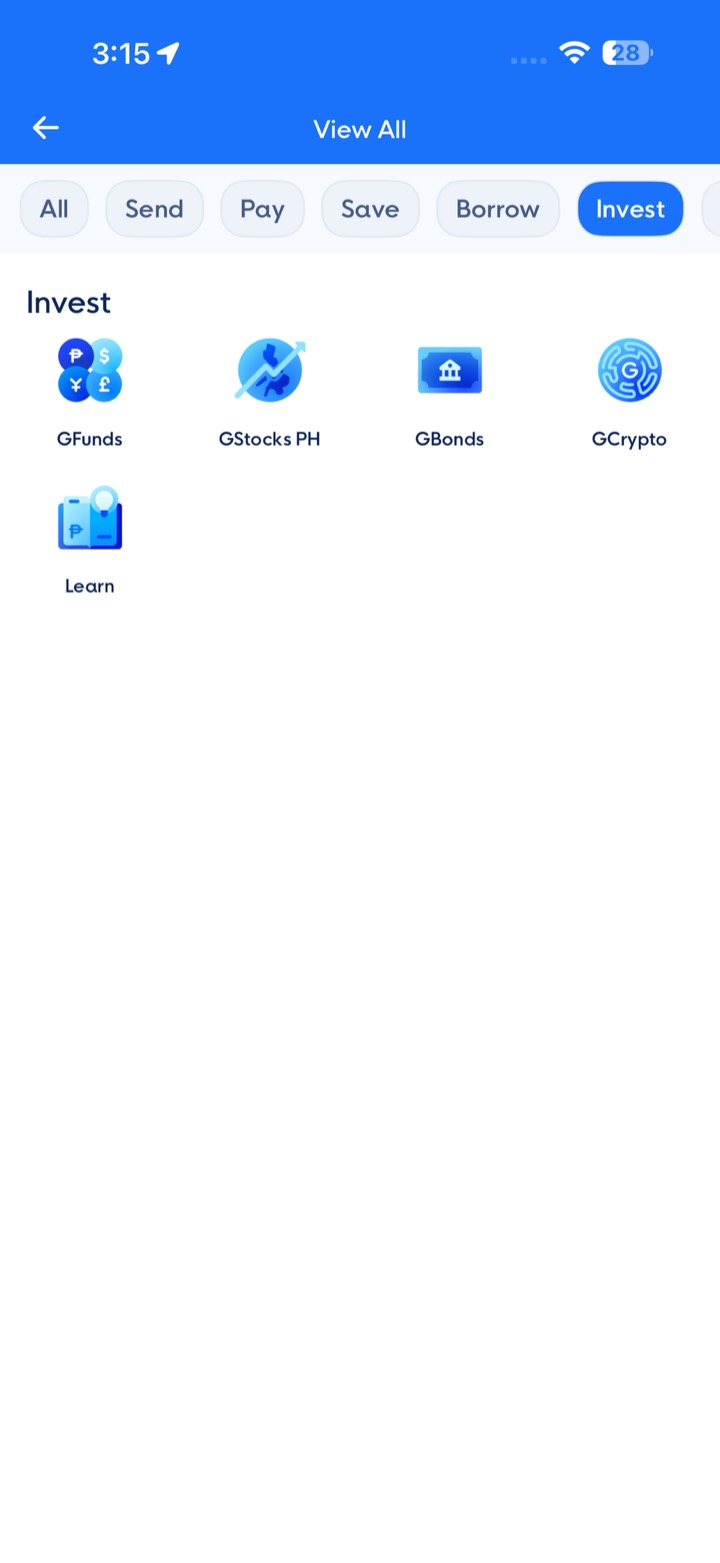
Under Explore the App, tap View All
Tap Invest, then GCrypto
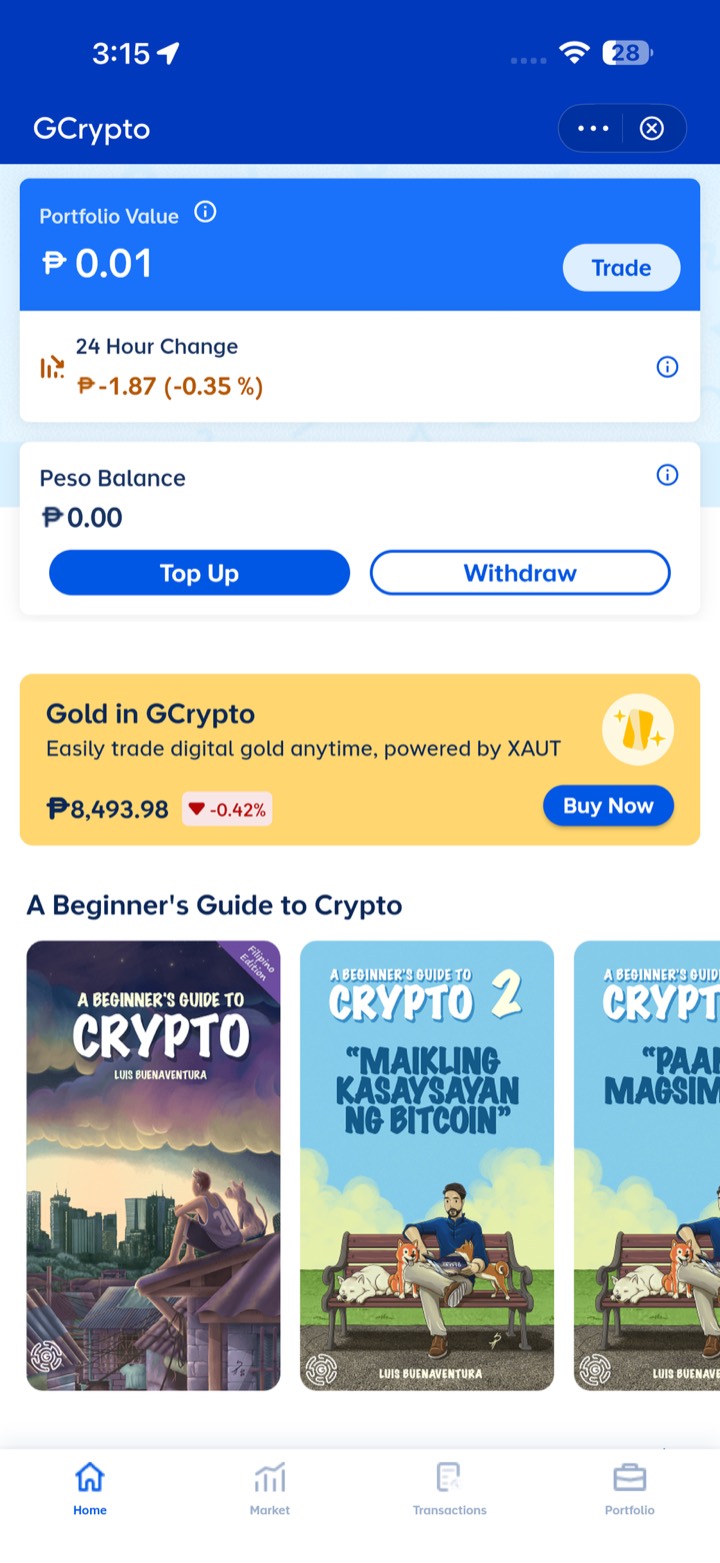
Answer the first-time questions
GCrypto may ask a few questions the first time (trading style etc.). Answer them, then continue.
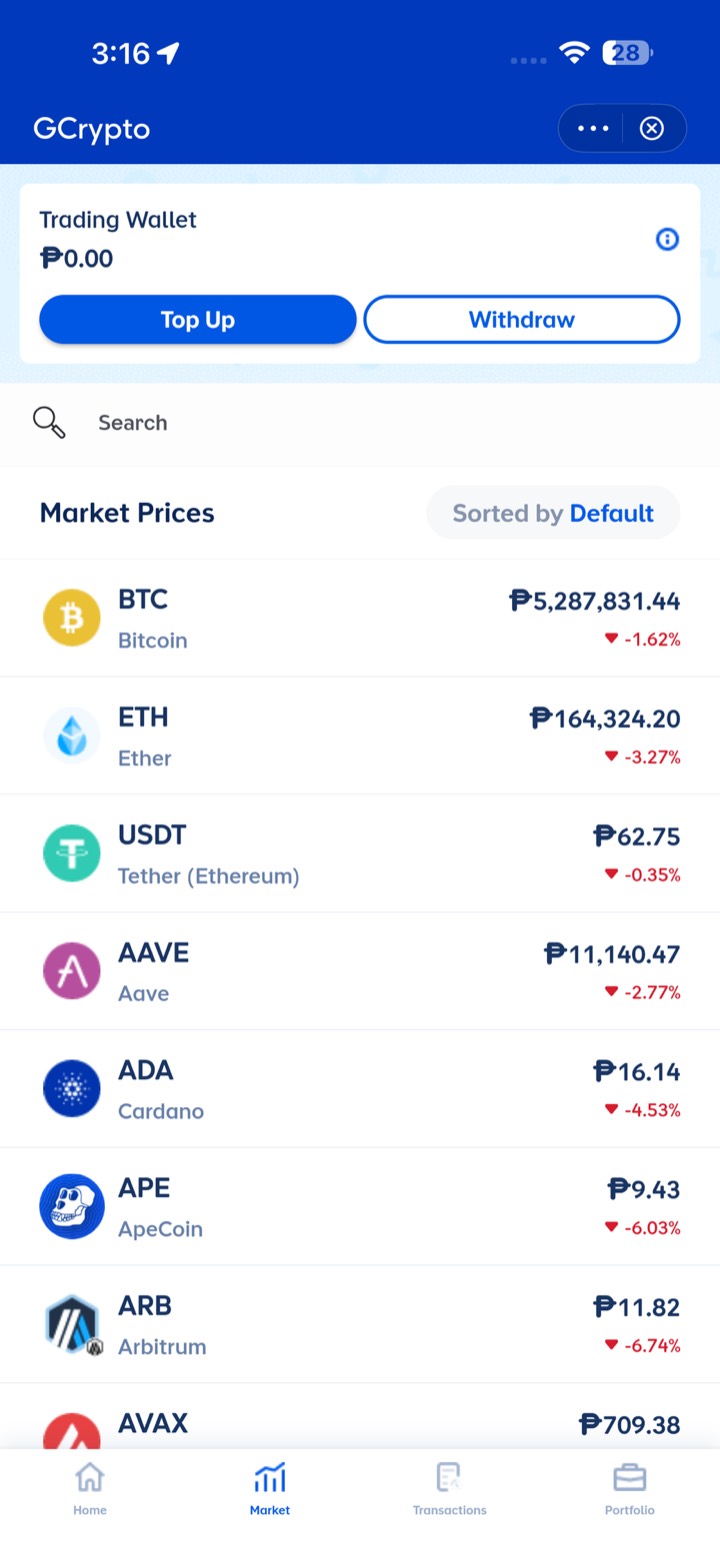
Tap Market
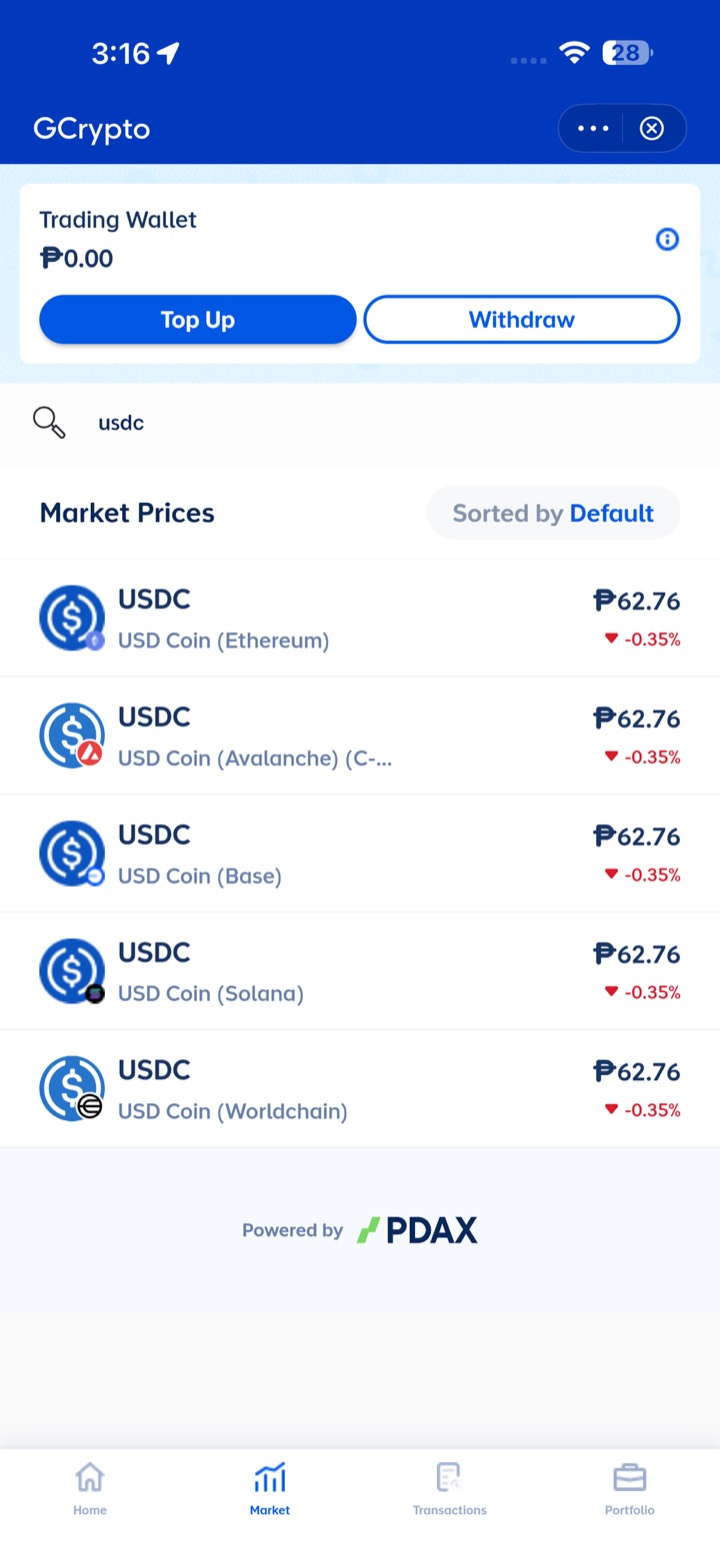
Search “USDC” and pick USD Coin (Base)
Tap Receive
Tap Copy next to the address
Help & public page
How it works, the rules, safety, language, sign out. And the public report anyone can open.
Help
How it works
- Find an open bounty on the map.
- Go there. Record the signboard, then shoot each part of the site.
- First verified set gets 20 USDC.
Clear shots get verified. Stay on public land, in daylight. Payouts are final.
About BantayGawa
Bounty rules
Who can join
18 or older. One account, one payout address.
What pays
20 USDC to the first verified set of shots of a site with an open bounty. Payouts are final.
Why submissions get rejected
- Farther than 150 m.
- Turned less than 60°.
- Signboard not readable.
- Shots too blurry or dark.
- Not enough of the site shown.
- Filmed from a screen.
- Copied shots.
Sharing
We may post your shots on our social pages. Your handle is not shown.
Limits
5 submissions a day. 3 paid a day; the next one pays after 12:00 AM Manila.
When a bounty opens again
90 days after it closes, or when the project status changes.
Safety
Public land only. Daylight only. Do not enter work sites.
Drainage canal, Brgy. Tumana
Evidence
Faces and plates blurredSignboard video
Most striking view
Whole structure
Close-up details
- Agency
- DPWH
- Recorded
- 6 Oct 2026
- Budget
- ₱12.5M
- Due date
- 30 Jun 2026
Help
How it works
- Find an open bounty on the map.
- Go there. Record the signboard, then shoot each part of the site.
- First verified set gets 20 USDC.
Clear shots get verified. Stay on public land, in daylight. Payouts are final.
Sign out?
Sign in again with your passkey. If you lose it, you lose the account.
About us
Proyekto natin ito. Bantayan natin.
Our mission
Make every public project visible from the ground.
What we believe
People should be able to see what is being built with public money, not just read the records.
How it works
- You show what is there: the signboard and the site.
- We verify it: place, time, and that the shots are real.
- It becomes a public report anyone can open.
Where we're going
Every report adds to a project's visual timeline. Over time, that builds a ground-truth record of public works across the country.
What we're not
- Not a political platform.
- Not a complaint portal.
- Not investigative journalism.
- Not a crypto product. USDC is just how we pay.
How we're funded
Bounties and the platform are funded by donors and partners.
Funders never see who records. They can choose an area or a type of project. They never get your details, and they never affect verification or payouts.
Work with us
BantayGawa runs on donors and partners. Pick what fits and write to us. We agree the details with each partner directly.
Fund bounties
Pay for bounties in an area or for a type of project.
Support the platform
A general donation for review, servers and the team.
Data and research partners
For newsrooms, NGOs and universities working with verified reports.
Other ways to reach us
Questions about a submission? Write to help@bantaygawa.ph. This page is for partners.